I have just cancelled Backblaze Computer Backup - which, at fourteen years running, is almost certainly my longest-running digital subscription. For years, Backblaze has quite literally kept memories safe - photos of good old times that cannot be replaced.
In the last few days, a post from Robert Reese surfaced on Hacker News pointing out that Backblaze had stopped backing up data from cloud sync accounts like Dropbox, OneDrive, and Google Drive. They failed to communicate this anywhere other than a release note, which was way too easy to miss.

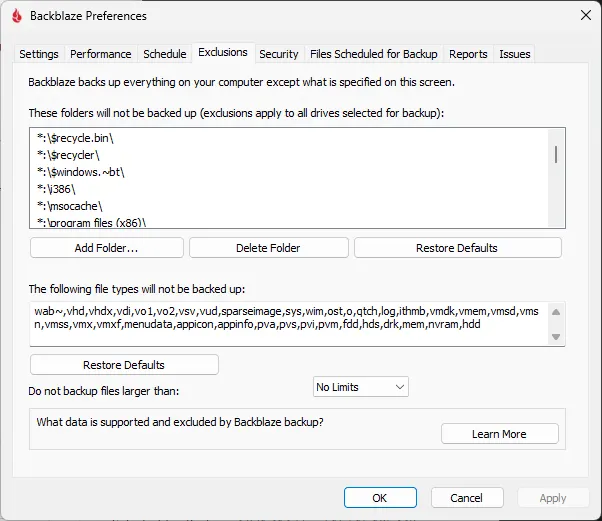
Finding out you're no longer buying the service you thought you were via release notes
Under the notes for Release Version 9.2.2.877 on Windows we find:
The Backup Client now excludes popular cloud storage providers from backup, including both mount points and cache directories. This prevents performance issues, excessive data usage, and unintended uploads from services like OneDrive, Google Drive, Dropbox, Box, iDrive, and others. This change aligns with Backblaze’s policy to back up only local and directly connected storage.
We also find on Mac the following improvements:
The Backup Client now blocks SSHFS-mounted drives and excludes system and cloud-synced folders like ~/Library/CloudStorage, Caches, Developer, Metadata, and Mobile Documents to prevent unintended backups and reduce data usage.The Mac release notes page has similar wording to the Windows release:
Recent macOS versions can mount cloud storage (for example, Google Drive, OneDrive, and Dropbox) in local paths, causing the Backup Client to mistakenly back them up. These cloud-mounted folders are now detected and excluded to avoid performance issues, excessive data usage, and restore complications.
Checking if it was true with support
What's interesting is when I contacted support, I had a back-and-forth conversation where Backblaze proposed various solutions to, in fact, allow me to continue backing up OneDrive. After thinking this was contradicting the release notes, I reflected on the incredibly quick & well written responses from their support team and realised I was talking to a customer support chatbot / agent... not a real human.
This made me reflect on the customer experience. Great that the business can save some costs here and handle first-level tickets rapidly - but shouldn't they be flagging retention or very negative sentiment emails to go to the human queue, not into the hands of an agent? Doesn't this risk making a miffed but recoverable customer into a miffed & unrecoverable customer?
After asking the chatbot to summon a human to take over the case in one of the handful of support interactions I've needed in my circa $1400 lifetime value to BackBlaze so far over ~ 14 years, a real person then confirms, in fact, this is Backblaze 'enforcing their policy' to only backup local files. So it seems it's been a jolly accident over the last 14 years that "unlimited backup" has included these files all along. Thanks for that banker's error.
Backblaze as a service has saved my proverbial bacon more than a few times... but this interaction solidified it. It seems the service the company is offering and the service the customer wants differ just a little too much.
It was a key part of my strategy to have an independent third party hoovering up regular copies of my OneDrive data in case something ever happened to my Microsoft account. But for the provider of that redundancy plan to silently change the service I was purchasing from them? No thanks, trust disintegrated in milliseconds.
One of the more interesting observations was that they made absolutely no attempt to retain me as a customer during the support interaction. Perhaps backing up around 3 TB of data for $99 a year is below their profitability so they were happy to see me go. This is plausible given the market rate seems to be around $6/tb a month these days.
Finding a solution that meets my needs
Over the last few days, this finally prompted me to review what was backing up, start to thin out data that I really didn't need anymore, and find a solution I could trust.
I have now settled on the following:
- Time machine is backing up my Mac locally
- Photos in iCloud Photos
- Regular automated syncing to an external 4 TB SSD:
- osxphotos to backup full offline copies of my iCloud photos library
- rclone to clone full offline copies of cloud accounts like OneDrive
- user directory backups
- Camera photos & a darktable library for RAW images from our camera
- Camera photos are also synced to a 2 TB SSD in my Windows gaming pc via Syncthing
Then the fantastic Arq app is connected to a Hetzner storage box and backing up:
- User directory on my Mac
- The external 4 TB SSD
I have then set up an hourly sync via Arq of my most critical data to a Cloudflare R2 S3 bucket.
Of course, all these files are encrypted locally before they're chucked up to their new cloud homes.
I am now working on thinning down some of the old RAW files and GoPro footage that I will unlikely ever look at again in my life to reduce the size of the external SSD backup, and then add a final layer of redundancy - backing up the whole lot to a service like Amazon Glacier for ultra-long-term deep storage monthly.
What have I learned from this experience?
- Pay attention to release notes & official comms from service providers - sometimes they will catch you off guard and force you to take action.
- Have redundancy in your systems - don't have everything reliant on one provider. Here, the backup vendor was meant to reduce my single point of failure in the event of something like my OneDrive account being blocked - but the backup ceased to be a backup with this change!
- Review your requirements - I thought I needed several more TB of backup than I actually needed & with deduplication, a lot of this was reduced even further. I had false requirements in my brain, and failing to lift the rock to see what's under there is a real factor. I found 200 GB of random old cycling videos of bike commutes to work!
I'm sure my new backup setup will morph over the coming years, but at least those changes will happen on my own accord & hopefully reduce the risk of a single vendor suddenly changing the backup risk but still taking my money. I must say hats off to Backblaze for promptly processing a pro-rata refund... but I am sad to see you go after 14 years of taking my money & providing a good service!